 Special promotion !!!


 Product description
Shopping Guide
Product description
Shopping Guide
Basic gameplay:
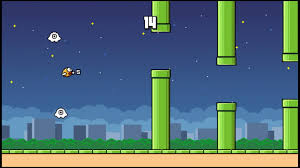
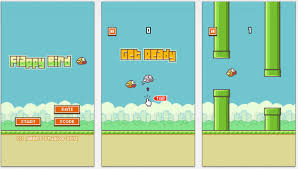
The player presses/taps to make the bird "fly up" for a beat, and when not pressed, the bird will be affected by gravity → fall down.
On the flight path, there are tubes/columns built at fixed or random distances, the player needs to avoid touching the tubes, if touched → game over.
The game has a score that increases according to the number of tubes passed.
This project helps you learn how to build a simple 2D side-scroller game, obstacle avoidance flight logic, score calculation, UI, and build multi-platform radar (mobile/web).
YouTube
+1
🧠 Technology & Techniques Used
Main Technology
Engine: Unity (2D side-scroller)
GitHub
+1
Programming Language: C# (mainly for input processing, character movement, collision logic, score)
gitstar-ranking.com
+1
Sprite & Graphics: use sprites for bird characters, pipes, background — create a classic 2D game feel.
Game-mechanics:
Input (press/tap to “flap” the bird to fly up)
Gravity and velocity/character movement
Spawn and move obstacles (pipes) from right to left or the player flies forward.
Collision detection: check when the character hits a pipe or falls off the screen → end the game.
UI & Score: Display current score, display “Game Over” screen when losing, possibly “Play Again” button.
Build target: Mobile (touch) and possibly Web/PC — helps learn how to set up inputs and build cross-platform.
Featured techniques
Create a pipe spawner system with prefab for reuse, set spacing/random for increased difficulty.
Create a parallax background movement effect — can be guided in Zigurous' video tutorial.
YouTube
Simple but effective logic to learn: not too complicated, but enough to understand making 2D games in Unity.
The project structure is clear and easy to extend: you can add features like “power-up”, “multiplayer”, “character change”… from here
⚙️ Installation and testing instructions
1️⃣ Download the project
git clone https://github.com/zigurous/unity-flappy-bird-tutorial.git
Or download the ZIP file from GitHub.
GitHub
2️⃣ Open in Unity
Open Unity Hub → select “Add project” → point to the downloaded folder.
Use the appropriate Unity version (see the README file in the repo for the recommended version).
3️⃣ Test run
Open the main Scene from the Assets/Scenes folder (or equivalent) in the project.
Press Play in Unity Editor to try it out: you will control the bird, press/tap to fly, avoid pipes and watch the score increase.
4️⃣ Build & Publish (optional)
Go to File → Build Settings → select the desired Platform (WebGL, Android, iOS, PC).
Set resolution, aspect ratio, input (touch or keyboard) if needed.
Click Build & Run to publish the test version.
💡 Highlights & Extensions
Highlights
Simple but addictive 2D side-scroller game: “flying to avoid pipes” — suitable for learning and entertainment.
Open source, easy to access and learn.
Logical guidance from start to finish: from project setup, sprite import, input, motion, UI – video tutorial included.
YouTube
+1
Expansion suggestion
Add more types of pipes/obstacles: move, rotate, change position randomly more.
Add power-ups: bird characters can pick up bonuses like “fly fast”, “reduce gravity”, “shield”.
Support multiple characters/birds with different skins.
Added online leaderboard/High score for players to compare scores with others.
Improved graphics & effects: added particles when hitting pipes or reaching high scores, added background music/sounds.
Added limited time mode, or rounds with increasing difficulty.
Bước 1: Truy cập website và lựa chọn sản phẩm cần mua
Bước 2: Click và sản phẩm muốn mua, màn hình hiển thị ra pop up với các lựa chọn sau
Nếu bạn muốn tiếp tục mua hàng: Bấm vào phần tiếp tục mua hàng để lựa chọn thêm sản phẩm vào giỏ hàng
Nếu bạn muốn xem giỏ hàng để cập nhật sản phẩm: Bấm vào xem giỏ hàng
Nếu bạn muốn đặt hàng và thanh toán cho sản phẩm này vui lòng bấm vào: Đặt hàng và thanh toán
Bước 3: Lựa chọn thông tin tài khoản thanh toán
Nếu bạn đã có tài khoản vui lòng nhập thông tin tên đăng nhập là email và mật khẩu vào mục đã có tài khoản trên hệ thống
Nếu bạn chưa có tài khoản và muốn đăng ký tài khoản vui lòng điền các thông tin cá nhân để tiếp tục đăng ký tài khoản. Khi có tài khoản bạn sẽ dễ dàng theo dõi được đơn hàng của mình
Nếu bạn muốn mua hàng mà không cần tài khoản vui lòng nhấp chuột vào mục đặt hàng không cần tài khoản
Bước 4: Điền các thông tin của bạn để nhận đơn hàng, lựa chọn hình thức thanh toán và vận chuyển cho đơn hàng của mình
Bước 5: Xem lại thông tin đặt hàng, điền chú thích và gửi đơn hàng
Sau khi nhận được đơn hàng bạn gửi chúng tôi sẽ liên hệ bằng cách gọi điện lại để xác nhận lại đơn hàng và địa chỉ của bạn.
Trân trọng cảm ơn.
Technical specifications
Category: Source game
Operating System: Linux CentOS 7
Configuration: 4 core 8 GB RAM
Language: Unity C#
| Image | Product | Price | Action |
|---|