
 Special promotion !!!


 Product description
Shopping Guide
Product description
Shopping Guide
Basic Gameplay:
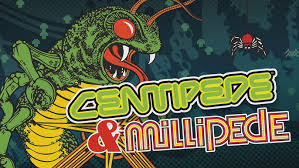
The player controls a ship/body at the bottom of the screen and shoots up to destroy “centipedes” (multi-part segments) that move in rows through mushrooms/obstacles.
When the head is shot, the whole or the body will split or change direction — creating a “chase” feeling.
The goal is to destroy all parts of the centipede before they reach you or get too close.
This project helps you learn how to set up parts like: enemy segments, row-column movement, collision, mushroom destruction, spawn/respawn management, arcade game logic.
🧠 Technology & Techniques Used
Main Technology
Engine: Unity (compatible version guided by Zigurous)
GitHub
+1
Programming Language: C# — all logic is written in C#.
GitHub
2D interface: using sprites, 2D colliders, enemy segments system – objects are spawned & move on a grid.
Enemy movement logic: managing the list of segments, handling collisions, when the head or body is shot, the segment splits or changes direction.
Mushroom or obstacle system: when shot, can be “changed state” or destroyed, affecting the enemy’s path.
Spawn system & wave management: basic for infinite/higher tier arcade games.
User interface, scores, restarts – help complete the game to a “playable” level.
Technical highlights
Managing each segment in enemy centipede (list/array) — helps complex logic like splitting, changing paths.
Collision checking using 2D collider (OverlapBox/OverlapCircle) for mushrooms and pathing.
Manage the state of each segment: alive, destroyed, parted etc.
Spawn mushrooms randomly or by area – create increasing difficulty.
Design the project in the form of a tutorial/learning sequence – clear code structure, easy to follow and extend.
⚙️ Installation and testing instructions
1️⃣ Download the project
git clone https://github.com/zigurous/unity-centipede-tutorial.git
Or download the ZIP file directly from GitHub.
GitHub
2️⃣ Open in Unity
Open Unity Hub → Add a project → select the downloaded folder.
Use a compatible version of Unity (refer to the README in the repo for the recommended version).
3️⃣ Test run
Open the main scene (usually in Assets/Scenes/…)
Press Play to run the game in the Editor — you will see the character, enemy centipede, mushrooms/obstacles.
Test the logic of shooting, moving, enemies transforming when shot.
4️⃣ Build & Publish (optional)
Go to File → Build Settings → select the desired platform (PC/WebGL/Mobile)
Click Build & Run to publish the game.
Before building, test the input (keyboard, touch if mobile) and set the appropriate resolution.
💡 Highlights & Extensions
Highlights
Set up a classic arcade game with a sense of suspense & chase.
The logic of separating enemy segments makes a difference from the usual shooting game.
The source code is clean and clear — suitable for learning/extracting for your own project.
Combine sprite, collider, spawn, wave logic — many practical technical parts in 2D games.
Extension suggestions
Add more enemy types: different speeds, different separation methods.
Add side-power-ups for players: increased shooting speed, larger bombs, faster mushroom destruction.
Support multiplayer mode (co-op/versus).
Adjust UI, add high score table, new level.
Add special effects (particle, shader) when enemy splits or explodes.
Add level editor or dynamic transformation map.
Bước 1: Truy cập website và lựa chọn sản phẩm cần mua
Bước 2: Click và sản phẩm muốn mua, màn hình hiển thị ra pop up với các lựa chọn sau
Nếu bạn muốn tiếp tục mua hàng: Bấm vào phần tiếp tục mua hàng để lựa chọn thêm sản phẩm vào giỏ hàng
Nếu bạn muốn xem giỏ hàng để cập nhật sản phẩm: Bấm vào xem giỏ hàng
Nếu bạn muốn đặt hàng và thanh toán cho sản phẩm này vui lòng bấm vào: Đặt hàng và thanh toán
Bước 3: Lựa chọn thông tin tài khoản thanh toán
Nếu bạn đã có tài khoản vui lòng nhập thông tin tên đăng nhập là email và mật khẩu vào mục đã có tài khoản trên hệ thống
Nếu bạn chưa có tài khoản và muốn đăng ký tài khoản vui lòng điền các thông tin cá nhân để tiếp tục đăng ký tài khoản. Khi có tài khoản bạn sẽ dễ dàng theo dõi được đơn hàng của mình
Nếu bạn muốn mua hàng mà không cần tài khoản vui lòng nhấp chuột vào mục đặt hàng không cần tài khoản
Bước 4: Điền các thông tin của bạn để nhận đơn hàng, lựa chọn hình thức thanh toán và vận chuyển cho đơn hàng của mình
Bước 5: Xem lại thông tin đặt hàng, điền chú thích và gửi đơn hàng
Sau khi nhận được đơn hàng bạn gửi chúng tôi sẽ liên hệ bằng cách gọi điện lại để xác nhận lại đơn hàng và địa chỉ của bạn.
Trân trọng cảm ơn.
Technical specifications
Category: Source game
Operating System: Linux CentOS 7
Configuration: 4 core 8 GB RAM
Language: Unity C#
| Image | Product | Price | Action |
|---|